
Whitelist Domain for Facebook and Instagram
Meta chat widgets load only on approved HTTPS domains: where the Whitelist Domain list lives, which channels have it, and why a widget stops on a new subdomain.
What you'll do: add your website's domain to the list Meta checks, so your Messenger or Instagram chat button can appear on it.
Time: 5 minutes.
If the Messenger or Instagram chat button does not appear on your website, the domain usually has not been whitelisted. Meta only renders these widgets on domains you have declared in advance, and only over HTTPS. Declaring them is what the Whitelist Domain list does.
Before you start
☐ Your site is served over HTTPS, with a valid certificate. If it is not, that is the first job: nothing else here will work.
☐ You know every domain and subdomain where you embed the chat button, including staging.
☐ Your bot is a Facebook Page or Instagram account. Whitelisting is a Meta requirement, so it applies only to the two Meta channels (see Reference).
1. Open Whitelist Domain
Click Chatbot Manager.
In the Bots / Accounts panel, select your Facebook Page or Instagram account.
Open the Integrations tab.
Click Whitelist Domain. It is the last sub-tab.
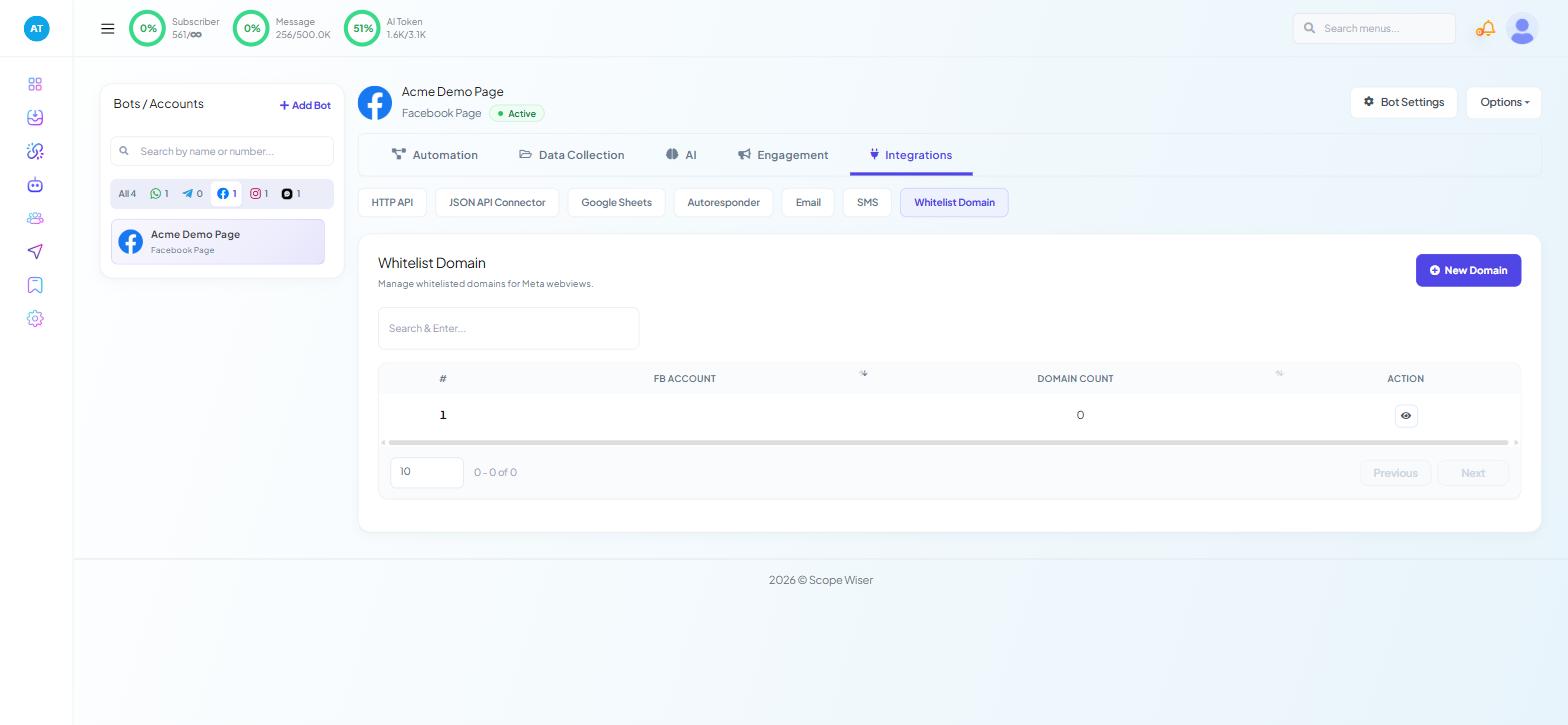
You should now see a page headed Whitelist Domain: "Manage whitelisted domains for Meta webviews."
2. Add the domain
Click New Domain at the top right. A small Add New Domain dialog opens with one field.
Enter the full address, including the protocol. The field's own example is
http://xyz.com; usehttps://if your site is served over it, which it should be.Click Save.
Repeat for every subdomain.
example.comandshop.example.comare two different entries.
Add the domain once; every page on it is covered.
3. Repeat on the other Meta bot
Each bot keeps its own list. Whitelisting a domain for your Facebook Page does not whitelist it for your Instagram account. Add it in both places.
4. Remove domains you no longer use
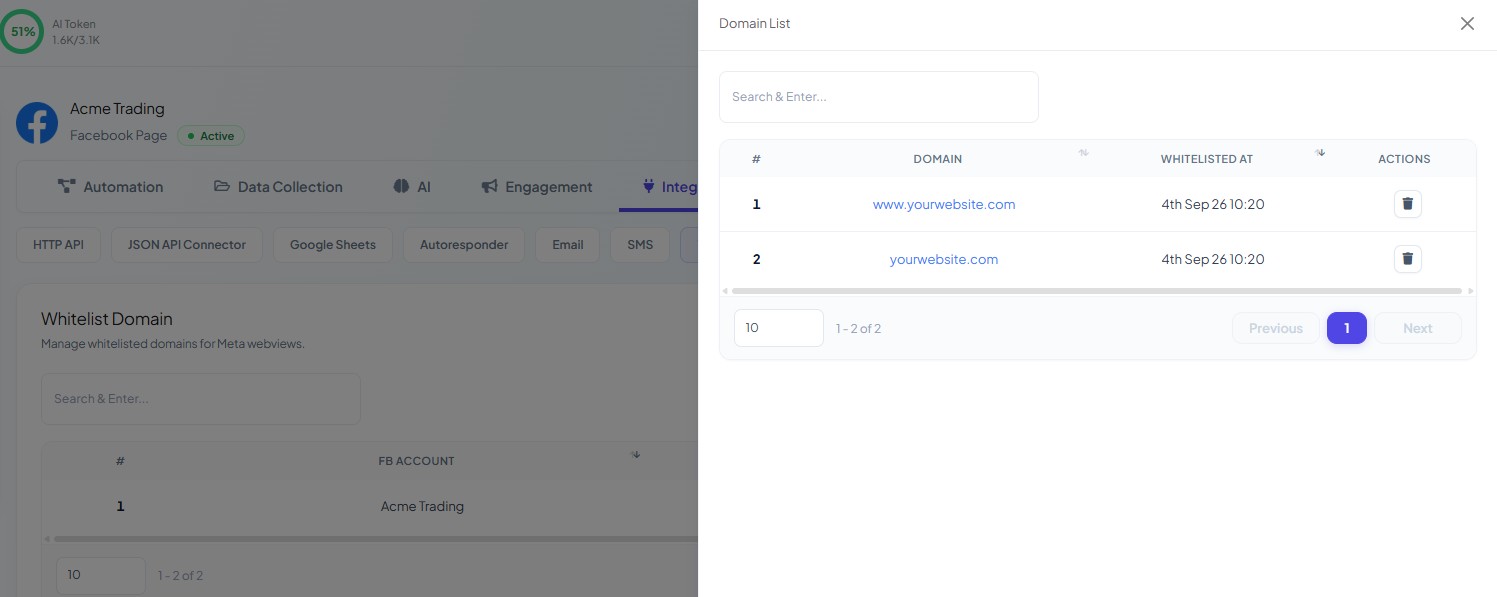
A stale entry is a permission you are still granting to a domain someone else may one day control. Removals take effect immediately.
✅ Done when…
☐ Every domain and subdomain where the button appears is on the list, with
https://☐ The list is set on both the Facebook and the Instagram bot, if you use both
☐ The button appears on your live site
If something doesn't work
Work through these in order:
Protocol. Is the page served over HTTPS, with a valid certificate? An
http://address is rejected.Exact host. Does the whitelisted entry match the host the browser shows, including any subdomain and any
www.prefix? A widget that works on your marketing site and vanishes on your shop is almost always a missing subdomain entry. It is the single most common cause of a widget that used to work.Right bot. Did you add the domain to the Facebook bot, the Instagram bot, or only one of them?
Connection health. Check Connect Account. A Page showing a status other than connected will not serve a widget regardless of your domain list. If the account looks wrong, Fixing Channel Connection Problems covers reconnection and permission errors.
Cache. Load the page in a private window before concluding it is still broken.
Whitelisting is not connecting. The domain list controls where a widget may render. It has no effect on whether your Page is connected, whether the bot is active, or whether a flow is correct. If the widget renders but does not reply, the problem is elsewhere.
Reference
Which channels have Whitelist Domain
Channel | Whitelist Domain |
|---|---|
Yes — Integrations tab | |
Yes — Integrations tab | |
Webchat | No |
No |
If you are embedding the Scope Wiser website widget, there is nothing to whitelist: that widget is configured under Connect Account → Webchat, and it loads on whatever site carries its embed code. WhatsApp chat entry points are links rather than embedded plugins, and are managed under Engagement → Chat Entry.
On Facebook, the widget itself is configured under Engagement → Engagement Widget; the domain list only decides where it is permitted to load.
The Whitelist Domain list
The list carries one row per connected account, with the columns #, FB Account, Domain Count and Action. The eye icon in Action, Domain List, shows the domains saved on that account.
What to do next
With the domain cleared, the widget still needs something to say. Persistent Menus, Get Started and Ice Breakers by Channel covers what a Facebook or Instagram visitor sees before they type anything. If the Page or account is not yet connected, start at Connect a Facebook Page or Connect Instagram DM Automation: both run through the same Facebook Integration page.
Next: Persistent Menus, Get Started and Ice Breakers by Channel