
HTTP API: The Complete Developer Guide
Everything Scope Wiser exposes over HTTP: the per-bot HTTP API wizard, the account-wide API Integration panel, the developer console, dynamic values, response mapping, monitoring and key security.
This guide is for developers and anyone comfortable with HTTP requests, headers and JSON.
This is the reference for the API side of Scope Wiser: where API configuration lives, what each screen is for, and the practices that keep an integration working after whoever built it has moved on.
Where API settings live
There is no single "Integration" section. API configuration sits in three distinct places, and choosing the wrong one is the most common way to lose an afternoon.
Per bot — Chatbot Manager → Integrations. Outbound calls a bot makes, and where anything a flow calls is defined. The sub-tabs differ by channel: WhatsApp offers HTTP API, Google Sheets, Autoresponder, Email and SMS; Facebook and Instagram add JSON API Connector and Whitelist Domain; Webchat adds JSON API Connector. Channel is not the only thing that decides what you see — INTEGRATION - HTTP API and the GOOGLE - entries are separate toggles under Control Panel → User Permission, so a team login can show fewer sub-tabs than its channel allows.
Autoresponder opens the account-wide settings page in a new tab.
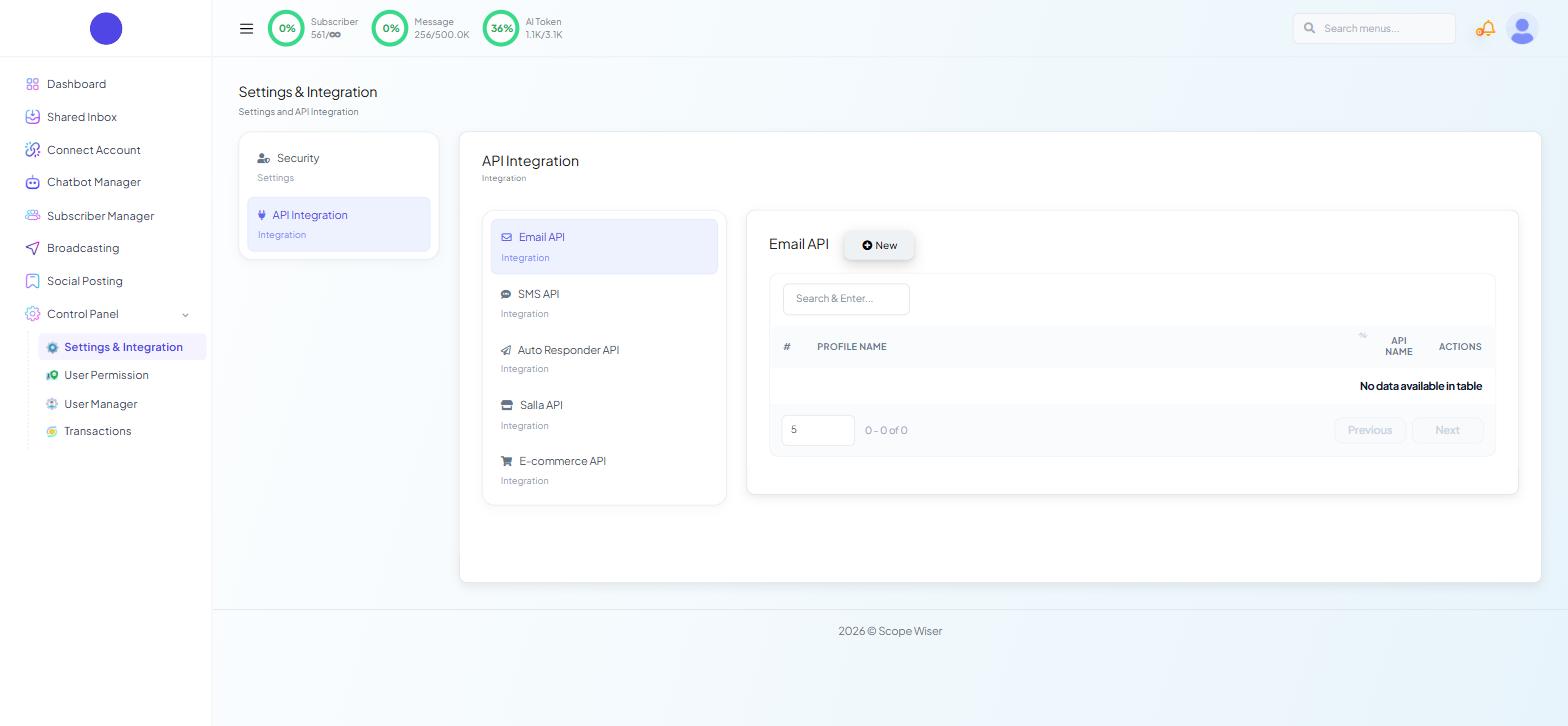
Account-wide — Control Panel → Settings & Integration → API Integration. Account-wide credentials (Email, SMS, Auto Responder, E-commerce) live here. New opens a drawer with a provider picker down its right-hand side, and the fields on the left change with the provider you choose.
Your own API — the developer console. Reached from the profile menu as API Developer. This is the opposite direction: your code calling Scope Wiser. Sending OTP Messages via the API works through one endpoint end to end.
The Add HTTP API wizard
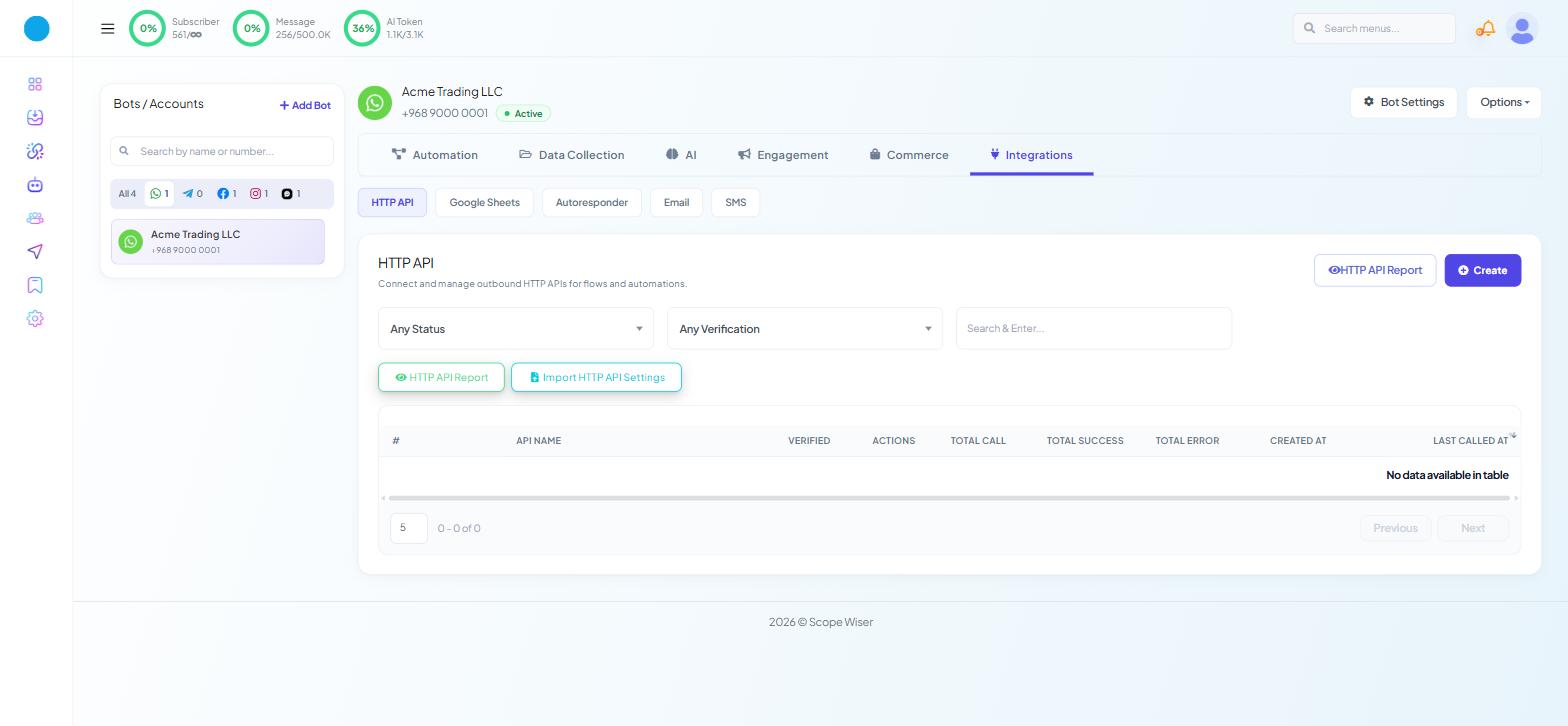
Go to Chatbot Manager, pick the bot, then Integrations → HTTP API. The page is headed HTTP API — "Connect and manage outbound HTTP APIs for flows and automations."
The table shows API NAME, VERIFIED, ACTIONS, TOTAL CALL, TOTAL SUCCESS, TOTAL ERROR, CREATED AT and LAST CALLED AT, with Any Status and Any Verification filters, Create, HTTP API Report and Import HTTP API Settings.
Notice that last button before you start typing anything twice. An API definition is saved per bot, but Import HTTP API Settings brings a saved one in rather than making you rebuild it — so an integration you have already tested on one bot moves to the next instead of being retyped, and retyping is where endpoints and keys pick up the character that breaks them. Build it once on the bot you test with, then import it everywhere else.
Create opens Add HTTP API — "Connect and manage your WhatsApp HTTP APIs" — a full page with four numbered steps: API Details ("Basic connection info"), Request Data ("Headers, body & more"), Test & Verify ("Test your API request") and Response Mapping ("Map response fields").
Calling External APIs From a Flow walks the wizard step by step. What follows is what decides whether the result survives production.
Choosing the method
In Method *, use the verb the API documents.
Authentication belongs in Headers
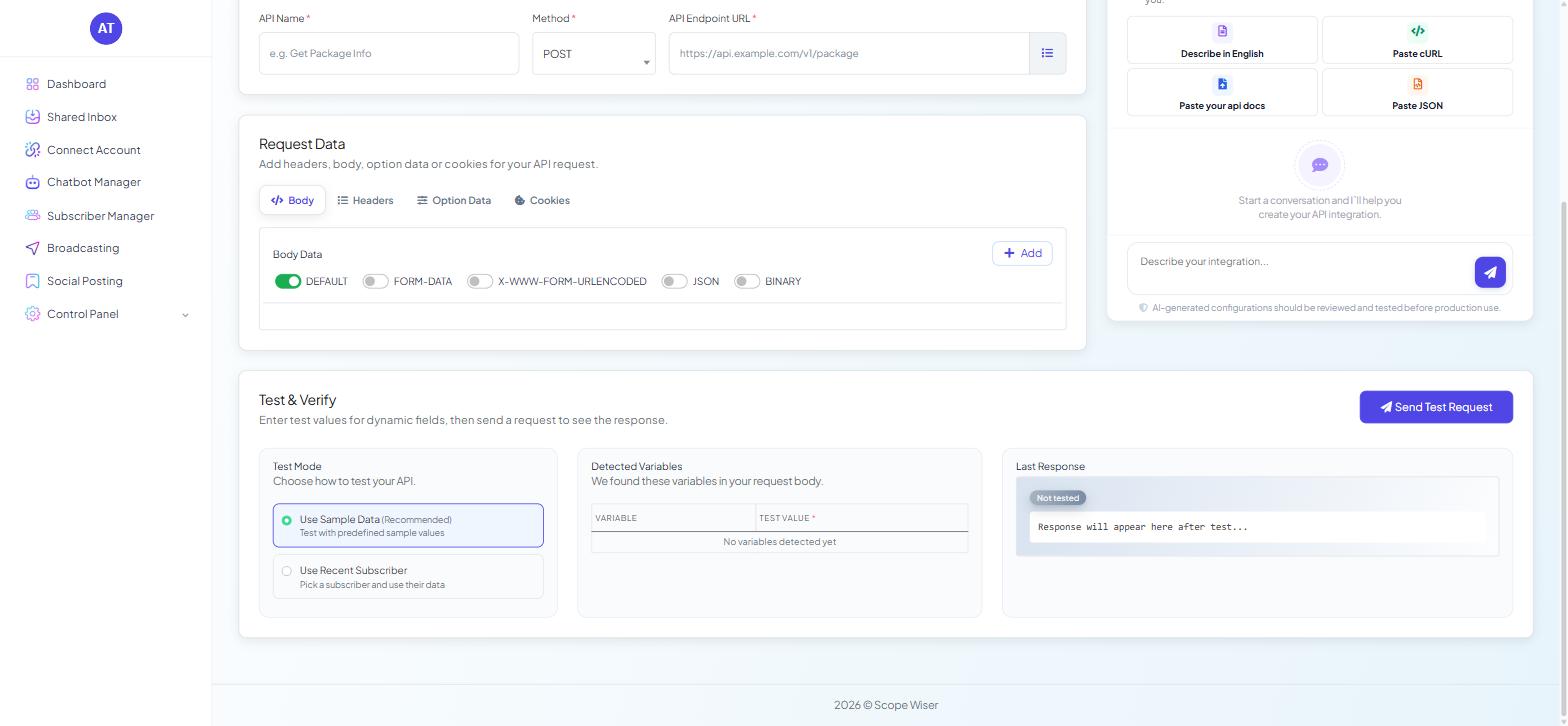
The Request Data section has four tabs — Body, Headers, Option Data and Cookies — each with + Add for new rows.
Copy header keys from the documentation rather than typing them — some providers treat them as case-sensitive.
Body Data offers DEFAULT (on by default), FORM-DATA, X-WWW-FORM-URLENCODED, JSON and BINARY. Match what the receiving API documents. Sending JSON as form data produces a 400 that reads like an authentication failure and sends people looking in the wrong place for an hour.
Static and dynamic values
A body field with a fixed value sends the same thing every time; a dynamic field pulls its value from the subscriber or from earlier in the conversation at call time, which is what lets one saved API serve every customer. Detected Variables — "We found these variables in your request body." — lists what the wizard found, with VARIABLE and TEST VALUE * columns. An empty "No variables detected yet" means your dynamic values are not being recognised, and no amount of testing fixes a request that sends literal placeholder text.
Test before you trust
Test & Verify — "Enter test values for dynamic fields, then send a request to see the response."
Test Mode offers Use Sample Data (Recommended) — "Test with predefined sample values" — and Use Recent Subscriber — "Pick a subscriber and use their data." Work in that order: sample data proves the request shape, a real subscriber proves the dynamic values resolve. Use your own record rather than a customer's. Send Test Request fires the call, and Last Response shows what came back — its badge reads Not tested until you send one.
Response mapping
Step 4 becomes available after a successful test. It is where returned values become things the conversation can use: an order status written to a custom field, a returned identifier stored against the subscriber, an array saved so a later block can render it as a list.
Without mapping, a successful call gives the conversation nothing. Skipping it produces a flow that works perfectly and says nothing useful.
The AI API Builder
An assistant panel sits beside the wizard, headed AI API Builder with a BETA badge — "Tell me what you want to build." Its shortcuts are Describe in English, Paste cURL, Paste your api docs and Paste JSON.
Pasting a working cURL command is the fastest route from documentation to a configured request. Its own caution is the right instruction: "AI-generated configurations should be reviewed and tested before production use."
Using a saved API
Once saved, an API can be called from more than one place.
The HTTP API block in the Flow Builder's INTEGRATIONS palette group, available on all four channels. Place it where the values it needs already exist, and follow it with a Condition so the conversation has somewhere to go when the call returns nothing — external systems return empty results routinely, and a flow with no branch for that goes quiet.
WhatsApp Flows forms. The form builder's FLOW SETTINGS panel has an HTTP API dropdown, and the form editor a SELECT HTTP API field with CREATE and REFRESH beside it, so a submission can call your API directly.
Alongside the sending features. Google Sheet Data Fetch sits in the same palette group for lookups that do not justify an API, and Outbound Actions pushes data out on a bot event with no API definition at all — Outbound Actions: Push Bot Data to Any CRM compares the four webhook-shaped features.
Monitoring
Three places tell you what is actually happening.
The HTTP API table. TOTAL CALL, TOTAL SUCCESS, TOTAL ERROR and LAST CALLED AT per API — the fastest triage there is. Zero calls means the block is never reached, so the problem is in the flow; calls with errors means the request is being made and rejected.
HTTP API Report, reachable from two buttons on that page, and the account-wide API Usage Log — "Recent API calls for your account." — reached from the profile menu under Account.
Two codes account for most failures. A 400 is usually the body — wrong format, a missing required field, a value the API will not accept. Getting 401 back points at the credential: expired, revoked, or pasted with a trailing space.
Practices that pay off
Name each API for the destination and the action — Brevo — add contact, Shopify — get order status — and copy endpoints and keys rather than retyping them.
Confirm the end result, not the status code, add a Condition after every call whose result the customer sees, and re-test after a change at either end.
Keeping keys safe
Keys belong in the wizard's Headers tab or in the account-wide API Integration panel, and nowhere else — not in support tickets, screenshots, public forums, exported flow templates or source control.
If a key has been exposed, rotate it at the provider straight away and update the header here.
What to do next
Calling External APIs From a Flow covers the wizard step by step and the flow patterns around the HTTP API block. To turn a response into something a customer can tap, read Displaying Dynamic Lists From an API. For calls the other way — your own code sending messages through Scope Wiser — see Sending OTP Messages via the API.