
What Follow-up Sequences Are
A Follow-up Sequence sends a planned series of messages over hours or days after someone opts in. What they are, where they live, which channels support them, and how they differ from broadcasts.
A chatbot conversation happens now. A Follow-up Sequence happens later — a planned series of messages that reaches a subscriber an hour after they opted in, then the next day, then the day after that, with nobody remembering to send them.
Welcome today. Reminder tomorrow. Offer next week. Set up once, running for every person who joins from that point on.
Where they live
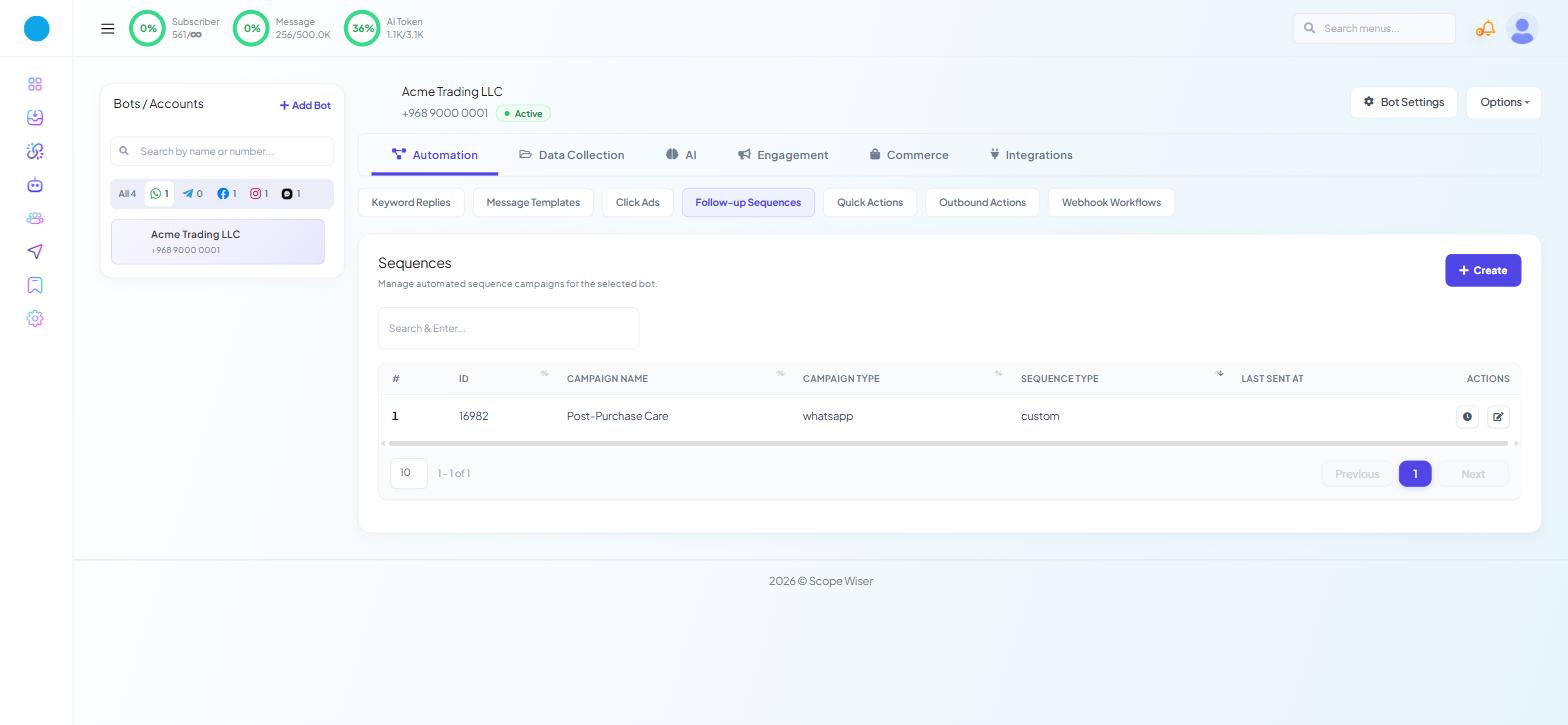
Open Chatbot Manager, select a bot, and stay on the Automation tab. The sub-tab is Follow-up Sequences.
The list carries the columns #, ID, CAMPAIGN NAME, CAMPAIGN TYPE, SEQUENCE TYPE, LAST SENT AT and ACTIONS, with a "Search & Enter..." box and a + Create button.
LAST SENT AT is the column that tells you whether a campaign is alive. A sequence with subscribers and a stale timestamp has stopped delivering, and that is usually the first symptom anybody notices.
ACTIONS holds exactly two icons: a clock, Regular Message Report, which opens the numbers for one step of the campaign, and a pencil, Edit, which reopens it in the Flow Builder. A saved sequence cannot be deleted, so choose a name you can live with and avoid creating test campaigns.
Which channels have them
Sequences work on WhatsApp, Facebook and Instagram. Webchat shows the tab but has no New Sequence Campaign block, so enrol website visitors through WhatsApp or Messenger.
Sequences are not broadcasts
Both send a message to many people. They differ in what starts the clock.
Follow-up Sequence | Broadcast | |
|---|---|---|
Timing | Relative to each person — one hour after they subscribed | Absolute — everyone at 10am on Thursday |
Audience | Whoever opts in, continuously | A segment you pick when you compose |
Runs | Indefinitely, for each new subscriber | Once |
Built in | The Flow Builder, from the New Sequence Campaign block | The Flow Builder, from Create Campaign in Broadcasting |
Managed at | Automation → Follow-up Sequences | Broadcasting |
How people get in
There are six ways in, from a button somebody taps to a store order event. Sequence Triggers: Labels, Time and Events goes through each one and says which to prefer.
How one is built
A sequence is a New Sequence Campaign node followed by a chain of Send Message After steps, each with its own delay and its own message. You build it in the Flow Builder, from + Create on the Follow-up Sequences list. The two build guides cover it click by click: Building a Messenger Sequence Campaign for Facebook and Instagram, WhatsApp Sequences With Template Messages for WhatsApp.
The 24-hour rule
After 24 hours of silence, WhatsApp only delivers an approved, paid template; Facebook needs a message tag. So every step from Day 1 onward must use Send Template Message (Anytime).
Where to see who is in one
Subscriber Manager has an All Sequences filter, and an In Sequences stat card showing the count and percentage of your audience currently enrolled.
A subscriber's detail panel has a Sequences tab listing their enrolments.
The Dashboard carries a Sequence Messaging Report widget with a View all link.
What to do next
Pick the channel you are building for: WhatsApp Sequences With Template Messages or Building a Messenger Sequence Campaign. Once a campaign has run for a few days, Measuring Sequence Performance shows where the delivery numbers live.