
Sequence Unsubscribe and Resubscribe Logic
How to take somebody out of a follow-up sequence, put them back in, and what the re-entry checkbox actually controls.
Two situations bring people here. A customer wants out of a drip campaign, and you need to honour that cleanly. Or a message did not arrive, and you want to reset that person so the sequence runs again from the start.
The re-entry rule decides most of it
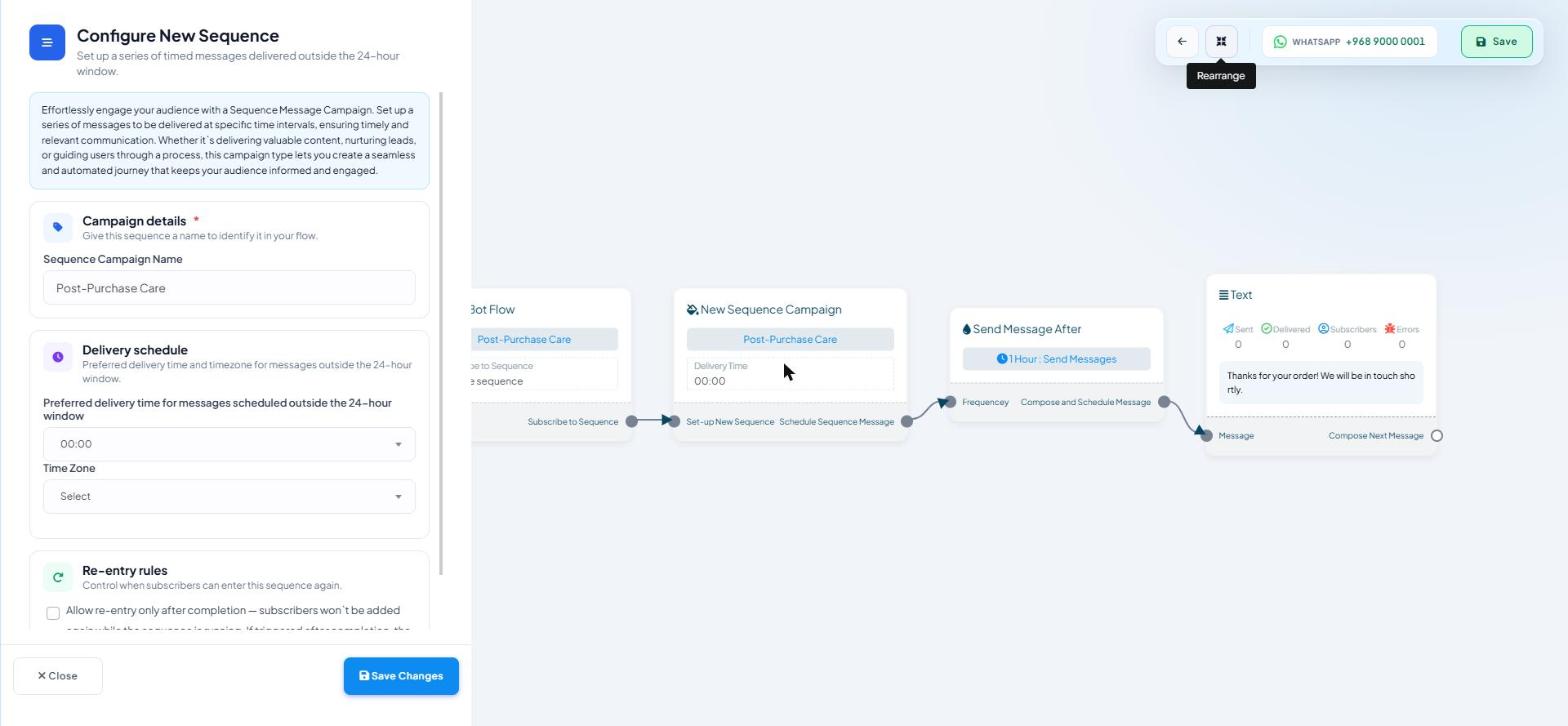
Open a sequence's canvas and double-click the New Sequence Campaign node. The Configure New Sequence panel has a Re-entry rules section containing one unticked checkbox:
Allow re-entry only after completion — subscribers won't be added again while the sequence is running. If triggered after completion, the sequence will restart from the beginning
Ticked. Somebody already mid-sequence cannot be added again. Trigger it a second time and nothing happens until they finish. Once they have finished, triggering it again restarts the campaign from step one.
Unticked. A second trigger enrols them again while the first run is still going, and they receive both. This is the usual cause of a customer complaining that everything arrives twice.
Tick it on any sequence with more than one entry point.
It controls re-entry, not exit. Nothing on this panel removes a person mid-run.
Letting a customer opt out
The clean route is a button the customer taps, so the decision is theirs and it is recorded.
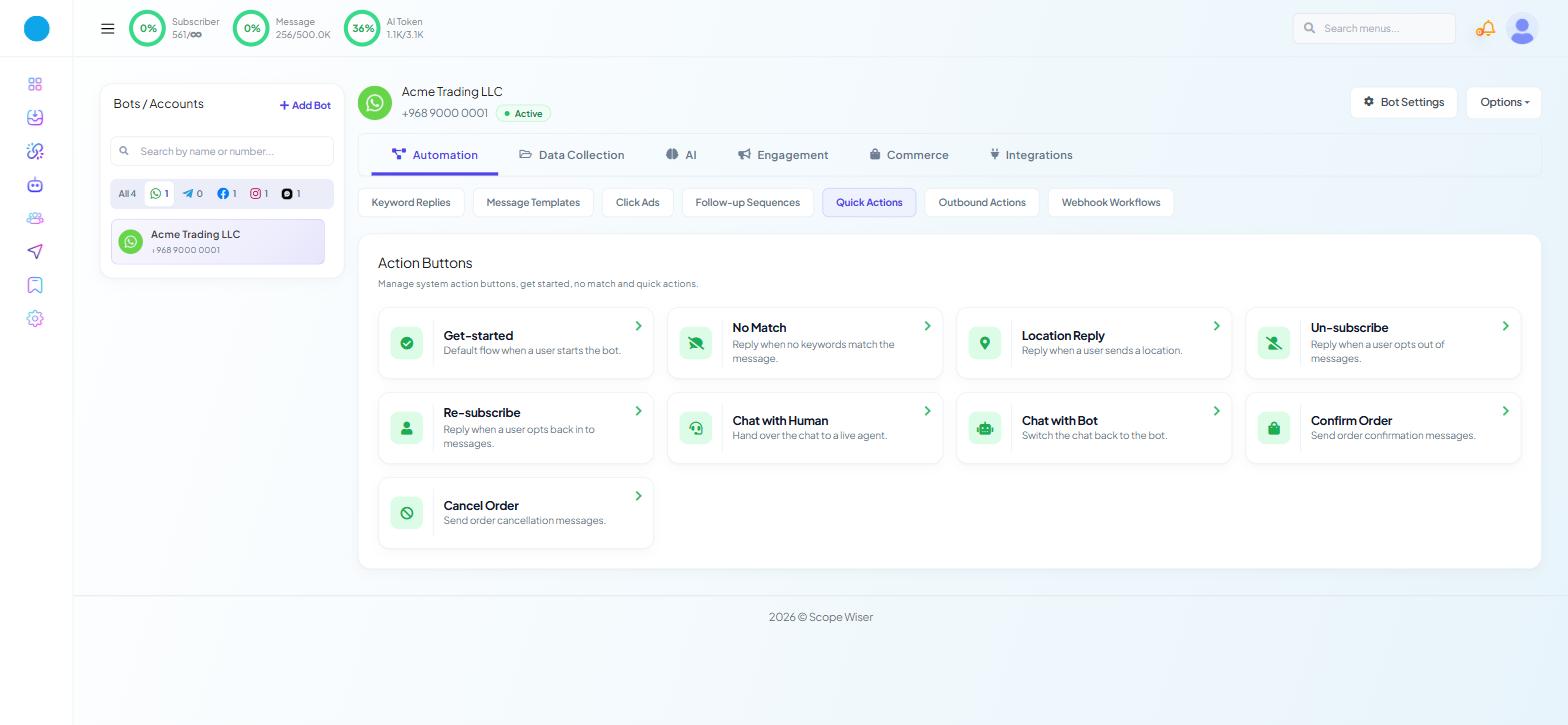
Go to Automation → Quick Actions, headed Action Buttons. Two ready-made flows sit there:
Un-subscribe — "Reply when a user opts out of messages."
Re-subscribe — "Reply when a user opts back in to messages."
Open either card; it is a normal editable flow. Change the wording of the confirmation message and Save. The default copy is generic, and an opt-out message is a good place to be gracious and to say plainly what happens next.
Both flows follow the same shape: a Start Bot Flow node, an Interactive block with the confirmation message, and a Button node offering the opposite action. Cards say Un-subscribe / Re-subscribe; the flows inside are named Unsubscribe / Resubscribe.
Removing someone from a specific sequence
One person. Open Subscriber Manager, find them with the "Search by name, number or email..." box, and open their detail panel. It has tabs for Overview / Agent / Labels / Lists / Sequences / Input Flows / Custom Fields / Notes. The Sequences tab lists their enrolments; remove the campaign there and click Save Changes.
In bulk. There is no bulk remove. Remove people one at a time from their Sequences tab, or automatically with a keyword's Unsubscribe from Sequence action.
In a flow. The Configure Reference panel on any Start Bot Flow node has an Unsubscribe from Sequence dropdown under Automation Actions, beside Subscribe to Sequence. This is the automated route: a keyword such as STOP, or a button in your opt-out flow, can remove someone without anybody touching Subscriber Manager. Point your opt-out button at that and the whole thing runs itself.
A saved sequence cannot be deleted, so retiring a campaign means taking the people out of it and removing its entry points.
Putting somebody back in
Once removed, the same entry points that enrolled them work again:
They trigger the keyword, or tap the subscribe button, and start from the beginning.
You assign them with Bulk Actions → Assign Sequence or Options → Assign Sequence.
You add the sequence on their Sequences tab and click Save Changes.
A fresh enrolment starts at step one, so they receive the whole series again — exactly what you want after a failure, and exactly what you do not want after an opt-out.
Resetting after a failed message
First find out whether the message failed or was never sent. Open the sequence flow and read Sent · Delivered · Subscribers · Errors on the step's card. Measuring Sequence Performance covers what each gap means and where else to look.
Then:
Confirm the failure from the node counters and the conversation thread.
Fix the cause — approve the template, correct the number, restore billing.
Remove the affected subscriber from the sequence.
Re-enrol them, by trigger or by assignment.
Watch the first step land before you repeat it for anyone else.
Fixing the cause before step three matters. Re-enrolling somebody into a sequence whose template is still paused reproduces the failure and costs you the sends.
What to do next
Measuring Sequence Performance covers the reporting side — where enrolment and delivery numbers appear across the product. If the failures turn out to be flow errors rather than delivery problems, Bot Error Logs and Custom Fields covers where those surface.