
Facebook RCN Broadcasting Explained
How Messenger's 24-hour rule works, what the RCN opt-in gives you, where the three RCN pieces live in Scope Wiser, and when a Facebook broadcast is right.
What this covers: how Messenger's 24-hour rule works, what an RCN opt-in lets you do, where the three RCN pieces are in Scope Wiser, and what Facebook broadcasts are good for.
Messenger has the same 24-hour rule as WhatsApp: you can message someone freely for a day after they message you, and then the door closes. WhatsApp's answer is the pre-approved template. Messenger's answer is different: you ask the person, inside the chat, for permission to keep messaging them, and they tap yes or no.
Scope Wiser calls this RCN (Recurring Notifications, Meta's name for the permission).
What the permission is
Your bot shows a request in the conversation, saying what the updates are about and how often they'll arrive. Messenger shows its own confirmation prompt.
If the person accepts, you may message them about that subject beyond the 24-hour window, for a fixed period.
If they decline, nothing changes, and you're still bound by the window.
Three things follow from this, and they shape everything you do with it:
Consent is per topic. Permission to send weekly offers isn't permission to send service announcements. Ask separately for genuinely different subjects.
Permission expires. It lasts for a set period, not forever, and runs out quietly. Someone who opted in last year isn't necessarily reachable today.
People can withdraw it at any time. Messenger gives them the control directly, so opt-outs happen completely outside Scope Wiser.
None of this can be changed from Scope Wiser. It's Meta policy, enforced by the platform. Without RCN you can't message Page followers after 24 hours. There's no list import: every opt-in is earned one conversation at a time.
Where the three pieces are
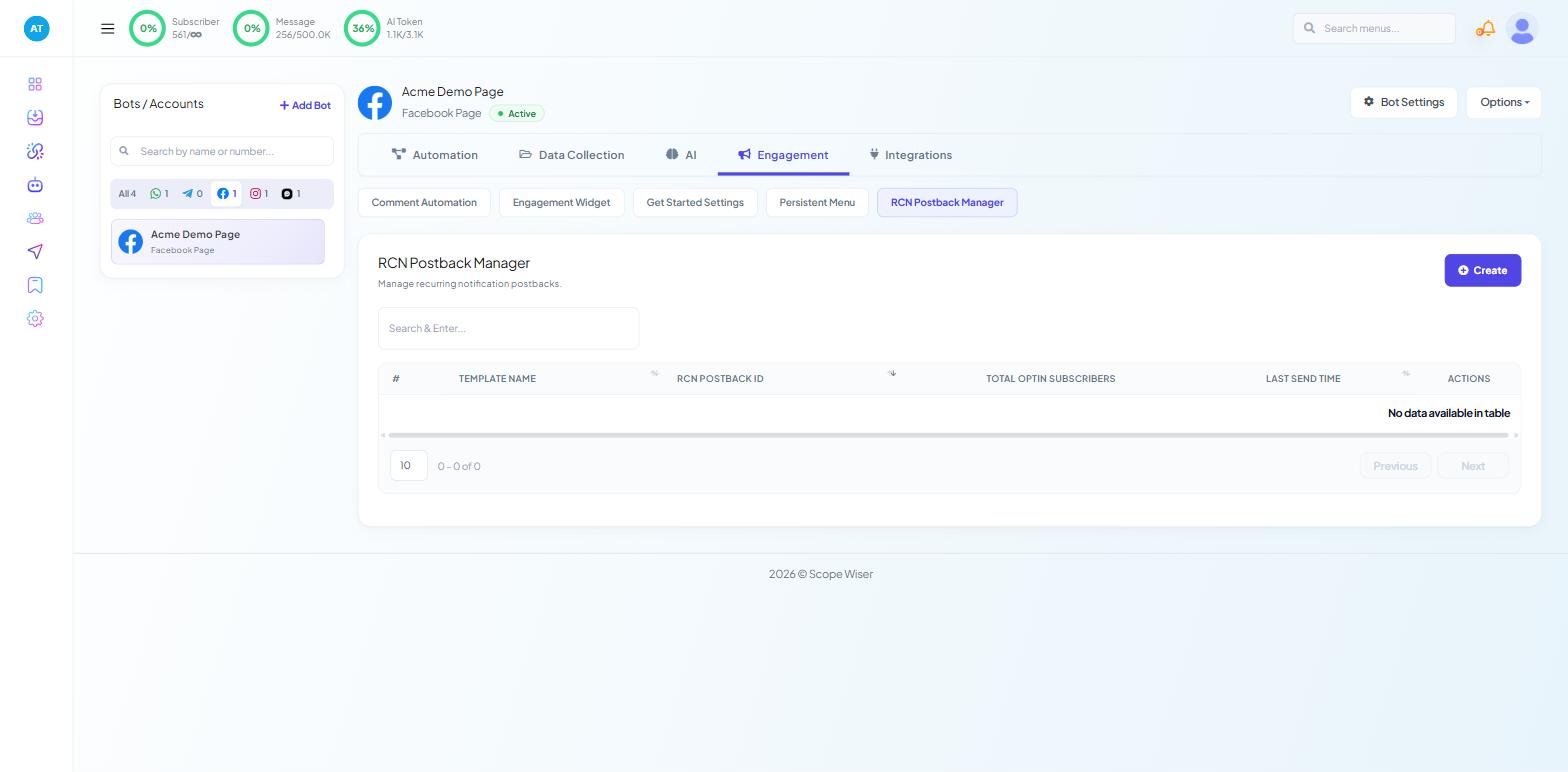
RCN Postback Manager. In Chatbot Manager, select your Facebook bot, then open the Engagement tab and its RCN Postback Manager sub-tab. This is where opt-in postbacks are created and kept. It exists on Facebook bots only: Instagram, Webchat and WhatsApp bots don't have it.
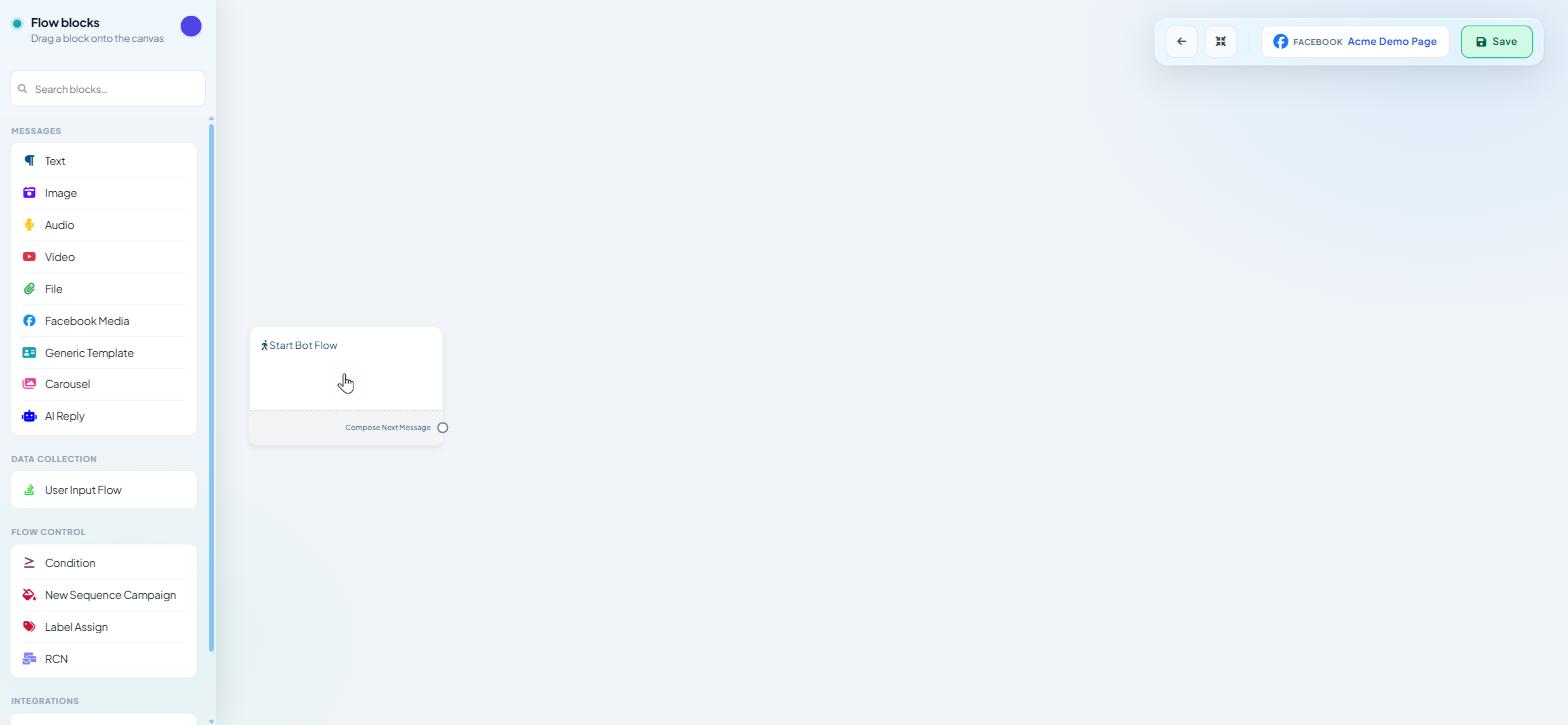
The RCN block in the Facebook Flow Builder. Open a flow on a Facebook bot. The
FLOW CONTROLsection of the blocks list has Condition, New Sequence Campaign, Label Assign and RCN. That block puts the opt-in request into a conversation.Broadcast Center's Facebook tab. Click Broadcasting in the left menu, then the Facebook tab. This is where campaigns to your opted-in audience are created and tracked.
How it all fits together
Create the postback. In RCN Postback Manager, build the flow that collects the opt-in. It's a normal flow with an RCN block in it.
Give people a way to reach it. A trigger keyword, a Get Started button, a comment-automation reply: anything that starts the flow.
They tap accept. Messenger's own prompt appears. If they accept, they join that topic's audience, with whatever label you set in the flow.
Broadcast to them. Later, from Broadcast Center's Facebook tab, you create a campaign aimed at that label. It reaches people who haven't messaged you in weeks.
Read the results. The campaign table shows processed, delivered, opened and unreached.
Steps 1 and 2 are in RCN Postback Manager: Collecting Opt-Ins. Steps 4 and 5 are in Running an RCN Broadcast Campaign.
What it's good for
The opt-in prompt names a subject, so what you send has to match it:
a weekly offer or restock notice for a shop
a monthly newsletter or content digest
event and session reminders for people who registered
programme updates for a course or membership
Things to watch
Quality still matters. Consent doesn't exempt you from Meta's quality monitoring. Reports and blocks affect a Page the way they affect a WhatsApp number.
Stick to the frequency you promised. Someone who agreed to weekly updates and gets daily ones will withdraw permission.
Permissions expire, so keep collecting. Build opt-in chances into your flows all the time, rather than running one campaign to gather them.
Nothing carries across from WhatsApp. A template approved for WhatsApp does nothing on a Page, and an RCN opt-in does nothing for a WhatsApp number.
Next: RCN Postback Manager: Collecting Opt-Ins. A Facebook broadcast has no audience until opt-ins exist. If your Page isn't connected yet, Connect Your Facebook Page comes first.