
Signature Messages, Automatic Labels and Chat Handover
Switch signature messages on in Bot Settings › Shared Inbox, write your own on your account page, and use session expiry and failure labels for handovers.
What you'll do: make the customer see a short message when a person joins the conversation, set how long the bot stays quiet after a human takes over, and tag failed deliveries automatically.
Time: 10 minutes.
A signature message tells the customer that a person has joined the conversation. Setup happens in two places, and both are needed: the switch lives on the bot, the words live on the agent's own account.
1. Switch signature messages on for the bot
Open Chatbot Manager and select the bot.
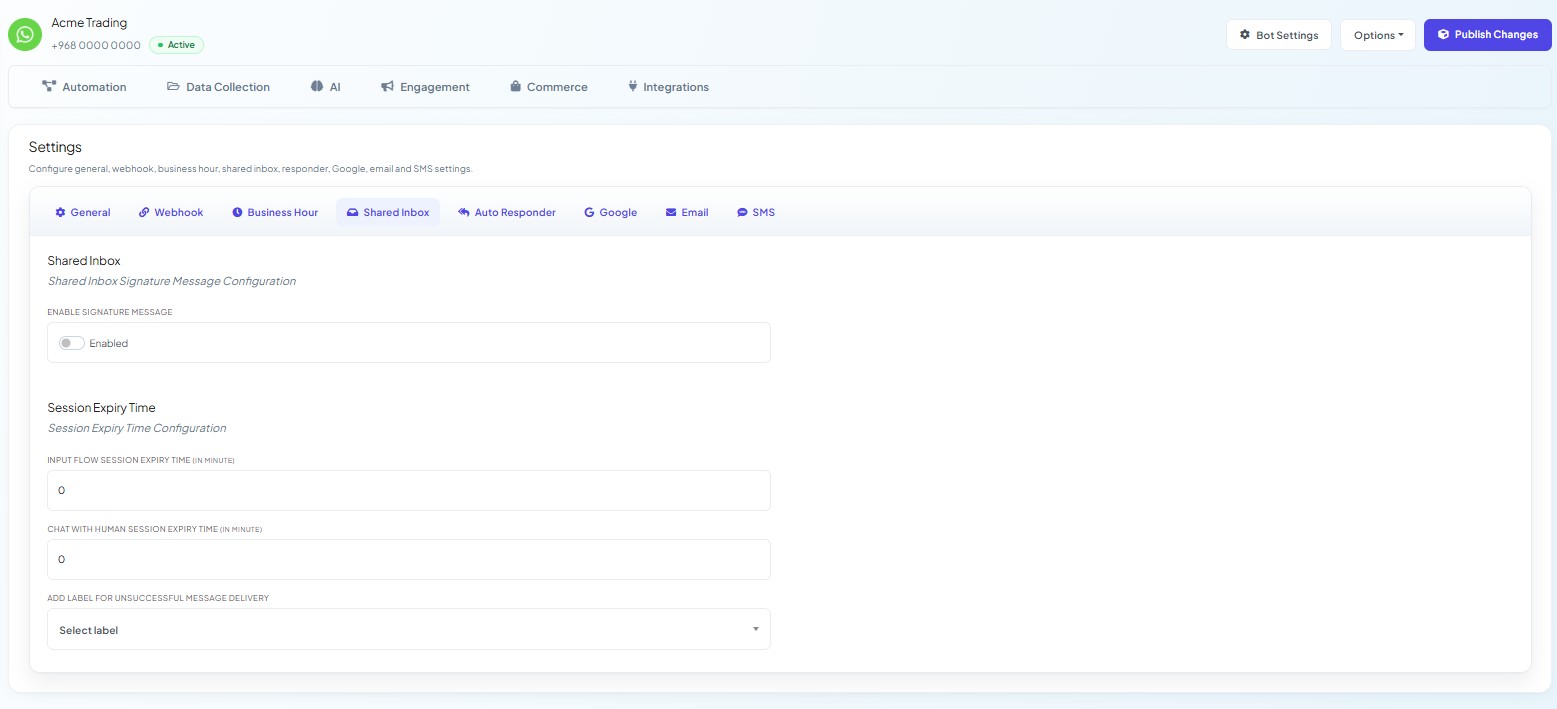
Click Bot Settings and choose the Shared Inbox tab. It holds two sections, Shared Inbox and Session Expiry Time.
Turn on ENABLE SIGNATURE MESSAGE. The toggle is labelled Enabled.
Click Publish Changes.
Publish Changes is required. Nothing on any Bot Settings tab takes effect until you press it.
This is a per-bot setting. If you run a WhatsApp bot and a Facebook bot, switch it on for each one you want it on for.
2. Write your own signature
Each agent writes their own text on their own account, so a signature reads as a person, not a department.
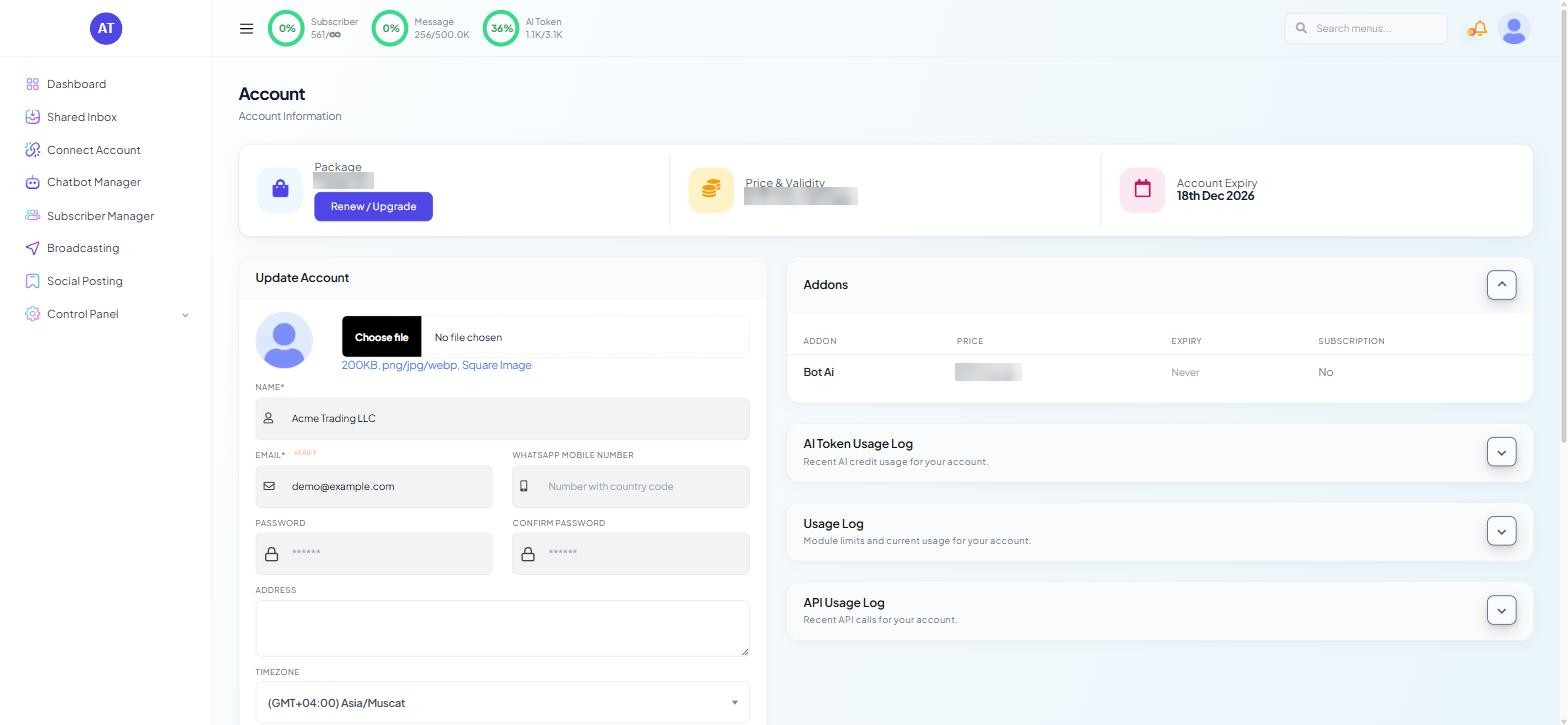
Open the profile menu at the top right and choose Account.
Scroll the Update Account form to SIGNATURE MESSAGE.
Type your line. Keep it short and factual, for example:
Hi, this is Sam from Acme Trading. I'll take it from here.
Click Update.
Two things to avoid:
Do not restate the customer's question back at them.
Do not promise a response time. The signature is sent the moment you join, before you have read the thread.
3. Set how long the bot stays quiet after a human takes over
The same Shared Inbox tab carries two fields under Session Expiry Time:
INPUT FLOW SESSION EXPIRY TIME (IN MINUTE)
CHAT WITH HUMAN SESSION EXPIRY TIME (IN MINUTE)
Both ship at 0.
Set CHAT WITH HUMAN SESSION EXPIRY TIME (IN MINUTE) to 30–60 minutes. This is how long the bot stays quiet after a human takes over.
Click Publish Changes.
Too short and the automation interrupts a live conversation. Too long and a customer who comes back hours later gets no automated reply.
4. Label failed deliveries automatically
Also on the Shared Inbox tab is ADD LABEL FOR UNSUCCESSFUL MESSAGE DELIVERY, a dropdown that starts at Select label.
Create the label first if it does not exist. Use something plain such as
delivery-failed.Choose it in the ADD LABEL FOR UNSUCCESSFUL MESSAGE DELIVERY dropdown.
Click Publish Changes.
Any message that fails to reach a contact now tags them with that label. Failed deliveries become one filterable list instead of disappearing.
5. Hand a conversation between people
Note first, label if needed, reassign last. See Assigning Agents and Joining Conversations.
✅ Done when…
☐ ENABLE SIGNATURE MESSAGE is on for each bot, and published
☐ Every agent has their own SIGNATURE MESSAGE saved on their account
☐ CHAT WITH HUMAN SESSION EXPIRY TIME is no longer
0☐ A label is chosen under ADD LABEL FOR UNSUCCESSFUL MESSAGE DELIVERY
If something doesn't work
The signature never arrives. Check both halves: the bot switch (and Publish Changes) and the agent's own SIGNATURE MESSAGE.
It arrives on one bot but not another. The switch is per bot. Turn it on for each one.
It fails on WhatsApp. The signature arrives as a message from your business, so it counts as a message like any other. On WhatsApp it can only be sent while the messaging window is open. Check the Messaging Window row in the Customer Snapshot section of the Chat Actions panel. Inside 24H with a running countdown means an ordinary message will be delivered. A red Outside 24H Window means it will not, and your signature will fail alongside everything else you try to send freely.
What to do next
Assigning Agents and Joining Conversations covers ownership and the permissions behind it. If you are still finding your way around the eight Bot Settings tabs, Bot Settings Explained: All Eight Tabs runs through all of them.
Next: Assigning Agents and Joining Conversations