
Preventing Bot Conflicts and Duplicate Replies
Why a bot answers twice, interrupts live agents, or floods a chat with its no-match reply, and the settings that fix each cause.
What you'll do: find out why your bot answers twice, talks over your agents or repeats its fallback, and fix it in the right place.
Time: 10–20 minutes.
A customer sends one message and gets two identical replies. Or the bot answers over an agent who is mid-conversation. Or someone asks three off-topic questions and gets the same fallback three times. Three different causes, each fixed in a different place.
Find your cause first
Every message duplicated? → multiple Meta apps sharing a webhook URL. Go to section 1.
Some messages duplicated? → overlapping keywords. Go to section 2.
Bot replying during an agent conversation? → Bot Settings. Go to section 3.
Same fallback repeatedly? → no-match frequency. Go to section 4.
Nothing arriving at all? → a different problem. Start at Why Your WhatsApp Bot Is Not Responding.
1. Every single message is duplicated
If every message gets exactly two replies (not just some), stop looking at your flows. The same message is reaching Scope Wiser twice, before it decides anything.
If you connected WhatsApp through Scope Wiser's sign-up, this is not your cause. Go to section 2.
If you set up your own Meta app (developers): this happens when a business creates a separate Meta app for each phone number and sets the same webhook URL in all of them. One inbound message then fires the webhook once per app. Two apps, two replies. Three apps, three.
The fix is structural: the WhatsApp Business API supports several phone numbers under a single Meta app. Use one app, with one webhook URL, and add each number to it.
Go to developers.facebook.com → My Apps and list every app you have created.
Open each one at your app → WhatsApp → Configuration → Webhook and note which of them share a webhook URL.
Choose one app as your primary.
Remove the webhook URL from all the others.
Message the bot again, with a keyword you know works, and confirm you get one reply.
If duplicates stop there, you are done. Do not change any keyword settings you were about to change.
2. Two of your flows match the same message
If duplicates are selective (one message triggers two answers, another triggers one), the cause is keyword overlap.
Go to Chatbot Manager → Automation → Keyword Replies.
Open each reply.
Click the Start Bot Flow node to see its Configure Reference panel, which shows the Trigger Keywords and the Keyword matching type.
Look for
String match. That is where overlaps come from: it matches when the keyword appears anywhere in the message, so a reply triggered byhialso fires on shipping and this. A second reply triggered byshipfires on the same message, and now the customer has two answers.
Repairs, in order of how often they work:
Switch short or common triggers to
Exact keyword match.Reserve
String matchfor distinctive words:refund,warranty,invoice.Merge two flows that genuinely serve the same intent, rather than trying to make their keywords differ.
Give one flow the keyword and have it branch, using a Condition block, instead of running two flows in parallel.
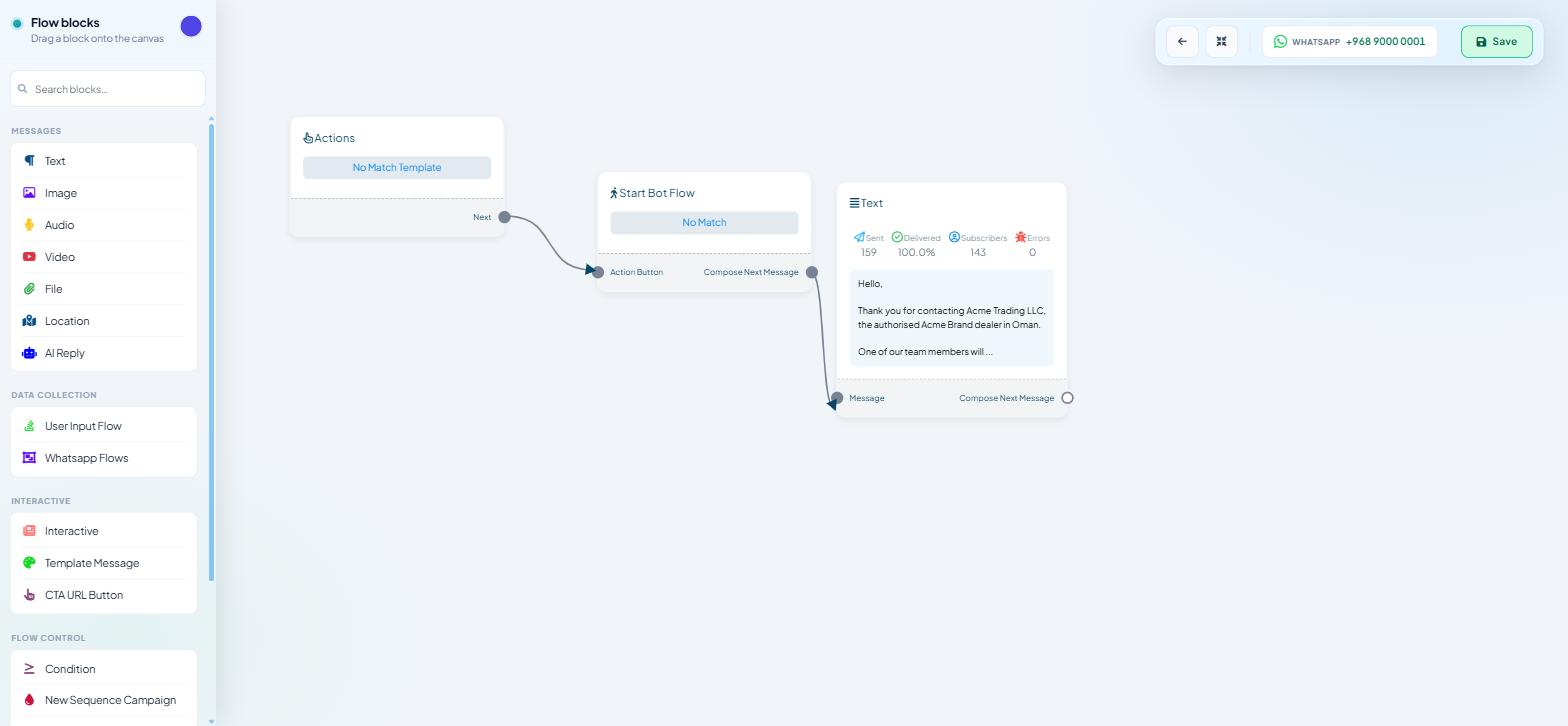
Confirm it with the node counters. Every message node in the Flow Builder shows Sent · Delivered · Subscribers · Errors on its card. After one test message, the Sent counter on the first node of both flows moves: that pair is your overlap. The counters are lifetime totals for the node, so on a bot carrying live traffic, note the numbers before you send.
3. The bot talks over your agents
Different problem, same symptom from the customer's side: two voices in one conversation. Three controls decide this, all under Bot Settings.
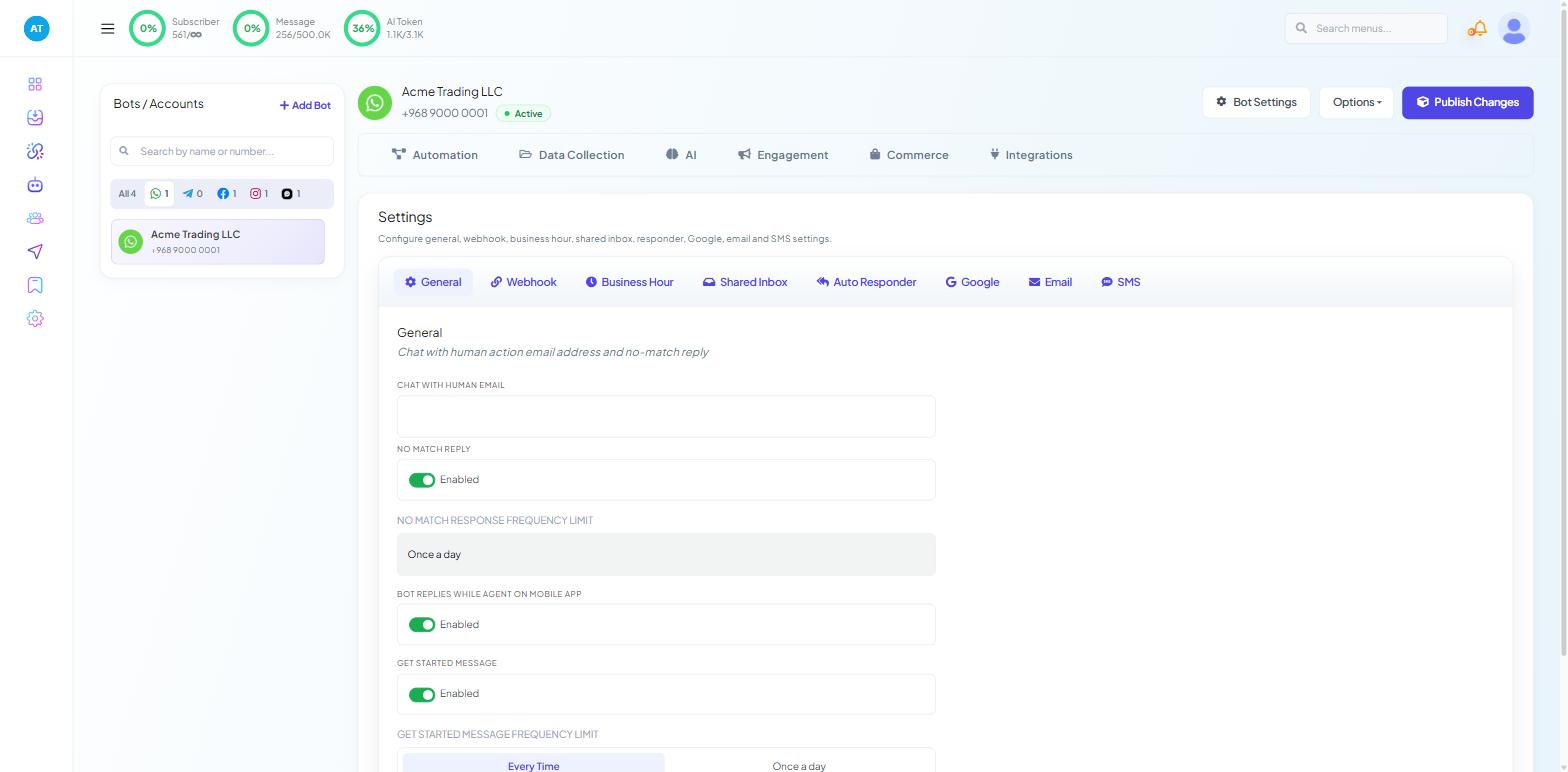
On the General tab, turn off
BOT REPLIES WHILE AGENT ON MOBILE APPif your team answers from a phone. Otherwise automation keeps firing underneath them.On the Shared Inbox tab, set
CHAT WITH HUMAN SESSION EXPIRY TIME (IN MINUTE). This is how long the bot stays quiet after a handover. A value of0and a value of5produce very different conversations. Set it to comfortably longer than your team's typical reply time.On the Business Hour tab, for the times nobody is there at all: set
TIMEZONEfirst, then the seven-daySTART/ENDtable, thenOFF DAY. TheSpecial Bot during business off hourssection, with itsENABLE SPECIAL BOTtoggle, lets a different reply run when you are closed, so an out-of-hours customer hears "we open at nine" rather than being handed to a sales flow that expects a person.Click Publish Changes.
Nothing in Bot Settings applies until you click Publish Changes.
For a single conversation right now: the Shared Inbox has a Pause Bot action in the Chat Actions rail. It is faster than changing a setting, and scoped to that one thread.
4. The no-match reply floods the chat
The no-match reply answers messages that match no keyword at all. Without it, a customer asking something you did not anticipate gets silence. With it configured badly, they get the same apology after every message they send.
Rewrite the reply:
Go to Automation → Quick Actions, headed Action Buttons ("Manage system action buttons, get started, no match and quick actions.").
Open the No Match card ("Reply when no keywords match the message."). It opens in the Flow Builder like any other flow: an Actions node with a No Match Template chip, a Start Bot Flow node, and an editable message node.
Rewrite it so it does three things: acknowledges the message, offers two or three things the bot can do, and offers a way to reach a person.
Add blocks if you need them, and save.
Limit how often it fires:
Go to Bot Settings → General.
Check
NO MATCH REPLYis on (marked Enabled).Set
NO MATCH RESPONSE FREQUENCY LIMITtoOnce a day.Click Publish Changes.
Every Time means every unmatched message gets the fallback: a customer typing three sentences in a row receives it three times, which reads as a malfunction. Once a day sends it once per subscriber per day, no matter how many unmatched messages arrive after it. For most businesses that is the right choice, and it is the single setting that turns a fallback from irritating into helpful.
✅ Done when…
☐ One test message gets exactly one reply
☐ The bot stays quiet while an agent is handling a conversation
☐ Several unmatched messages in a row get the fallback only once
If something doesn't work
Duplicates continue after removing webhook URLs. The cause is keyword overlap. Go to section 2.
A settings change made no difference. You didn't click Publish Changes.
A WhatsApp message seems ignored. A free-form message sent after the 24-hour window has closed is not delivered; outside it only an approved template is delivered, and a rejected send looks exactly like a bot that ignored somebody.
Nothing arrives at all. See Why Your WhatsApp Bot Isn't Responding.
Reference
When flows overlap by design
Some collisions are not keyword accidents: a broadcast lands while a comment-reply automation is running, or a sequence message arrives mid-conversation. Two rules keep them apart:
Keep broadcast and auto-reply logic in separate flows, rather than one flow that tries to do both.
On WhatsApp, do not schedule a free-form message where the 24-hour window will have closed. Outside it only an approved template is delivered.
No-match settings
NO MATCH REPLY: the toggle, marked Enabled.NO MATCH RESPONSE FREQUENCY LIMIT:Every TimeorOnce a day.
What to do next
Bot Settings Explained: All Eight Tabs documents every tab used above, including what each toggle changes and the order worth configuring them in. If replies are failing rather than duplicating, Bot Error Logs and Custom Fields covers the error counters and where failures surface.
Next: Bot Error Logs and Custom Fields